

2026-07-13 · 5 min read · Raw Drafts / Learning / Drawing
I Asked for a Drawing Teacher and Got a Poster
I wanted one small drawing lesson at a time. The first response showed me the whole path instead.
I asked ChatGPT to teach me how to draw step by step, with a visual for every lesson.
It made me a poster.
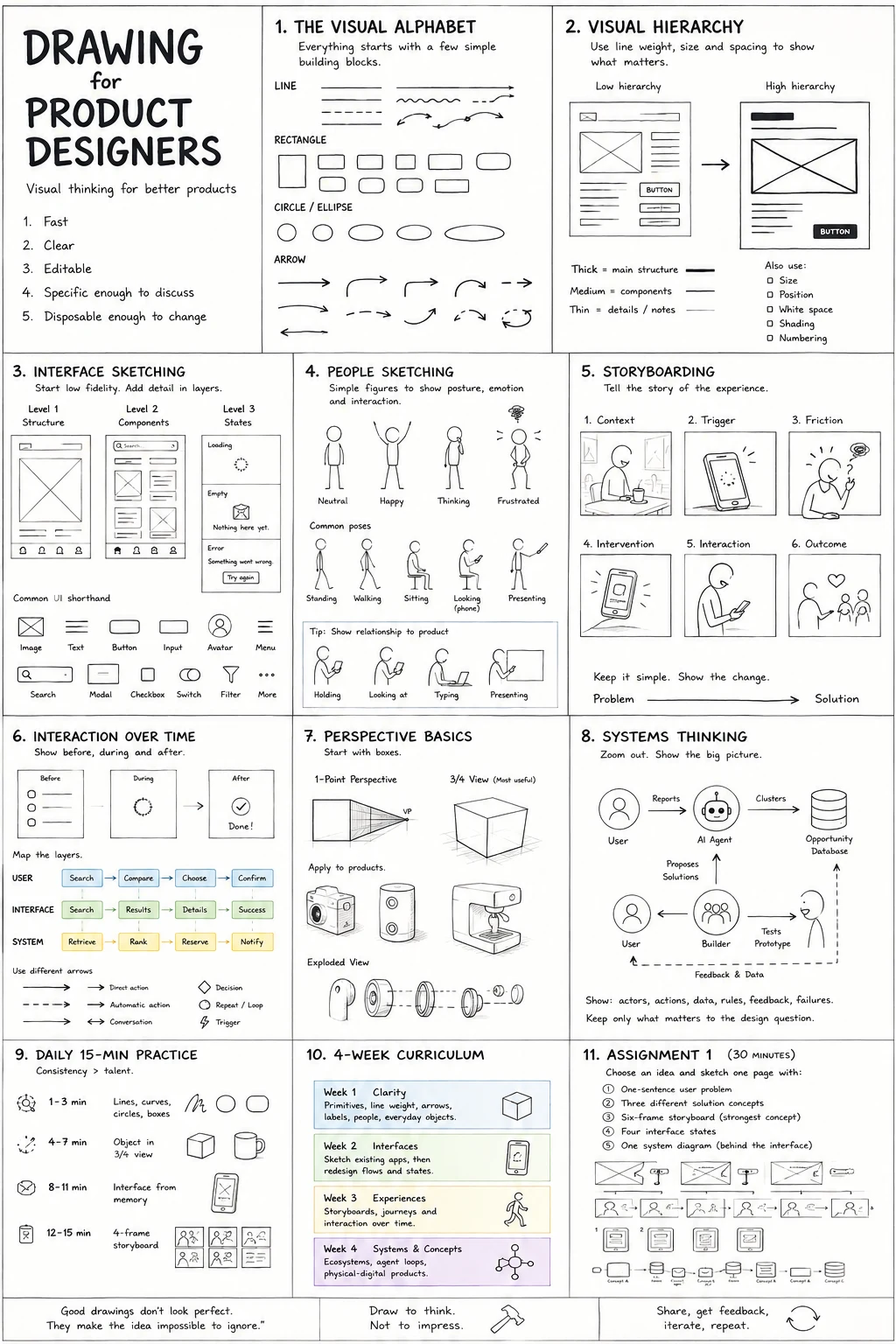
The poster was perfectly reasonable. It had lines, shapes, shading, perspective, and the usual progression from beginner exercises toward more complicated drawing. If I had asked for a summary of how to learn drawing, it would have been fine.
But I had not asked for a summary.
I wanted it to come back the next day.
That was the part I had apparently failed to explain. I was not looking for a guide I could save somewhere and forget. I wanted a small lesson now, another one tomorrow, and some sense that the second lesson knew what the first one had been.
More like Duolingo, except for drawing.
Once I said that, the difference became obvious. A poster compresses the whole process into one image. A teacher stretches it out over time. The poster says, “Here is the path.” The teacher says, “Do this today.”
I wanted the second thing.
That sent me looking for drawing apps that work in the same way. There are plenty of them, at least on the surface. Some give you short lessons. Some have streaks. Some let you trace over drawings. Some score your lines. Some give you a prompt every day.
They all seem close to the idea.
Then the hardware problem appears.
A lot of drawing apps assume that you are drawing directly on the device. That makes sense from the app’s point of view. If the line happens on the screen, the app can see it. It can compare your stroke with the example, tell whether you missed the shape, and give you instant feedback.
I have an iPhone. I do not have a stylus.
I could draw with my finger, but that feels like learning handwriting with a bar of soap.
The obvious alternative is to use the phone as the lesson and paper as the place where the drawing happens. Put the phone beside the sketchbook, watch one step, pause, draw, continue.
That setup feels almost too basic to count as a product idea. It is just a phone, a pencil, and paper.
It may also be a better way to learn.
Paper removes a lot of decisions. There are no brushes to browse through, no layers, no zooming, and no undo button. You make a line and then live with it. For a beginner, that is probably useful. You notice hesitation because it stays on the page.
The phone can still do the parts it is good at. It can show the next exercise. It can keep track of the sequence. It can remind you to practise. It can explain why a circle is useful before asking you to draw twenty of them.
The missing part is feedback.
It is easy for an app to score a line drawn on its own canvas. A photo of a pencil sketch is messier. The paper may be tilted. The lighting may be bad. The marks may be faint. The drawing may be wrong in a way that does not fit into a simple accuracy score.
That is also where a useful teacher would matter most.
“Your line is too shaky” is more helpful than 74 percent.
“Look at how the cup narrows near the bottom” is more helpful than a green tick.
A real daily drawing app would need to remember these things. If I keep making circles too flat, it should bring them back a few days later. If my lines are confident but my proportions are off, the next lesson should reflect that.
This is where most “Duolingo for X” ideas become less convincing. They copy the streak, the short lesson, and the bright interface. The harder part is deciding what should happen tomorrow.
A daily prompt is not the same as a course. Drawing a tree today and a shoe tomorrow may keep the habit alive, but it does not tell me whether I am learning anything in a useful order.
Tracing is also strange. It can make the first few minutes feel good because the result looks better than it otherwise would. But the decisions have already been made for you. You are following the line rather than working out where it belongs.
I do not think either of these is useless. I just kept running into the same gap.
I wanted someone to choose the next exercise for me.
The first lesson ChatGPT eventually gave me was line control. Draw between two dots. Make parallel lines. Practise curves. Draw circles. Build a few boxes.
It was basic, which was the point.
The lesson took about ten minutes. The instruction that stuck with me was to stop drawing every line slowly. Slow lines often wobble. You look at the destination, rehearse the movement above the page, and then draw.
That is a small enough idea to remember the next day.
It also made me realise that I was not really looking for a drawing app. I was looking for a sequence of small corrections.
A person who already knows how to draw probably has those corrections running in their head. They see a bad proportion and know what went wrong. A beginner just sees that the drawing looks off.
The app, or teacher, or whatever this is, has to bridge that gap without turning every exercise into a lecture.
I still like the idea of a Duolingo for drawing, but I mean something more specific now.
It would not need to turn the phone into a sketchbook. It could sit beside the sketchbook.
It would give me one thing to notice, one thing to practise, and one reason to come back tomorrow.
The poster was not useless.
It just tried to show me the whole staircase when I only needed the first step.
AI authorship note
This essay began with Kris Haamer asking ChatGPT to teach him drawing step by step. AI supported drafting, editing, and implementation. Kris is responsible for the experience described, the editorial direction, and the decision to publish it.