

2026-07-26 · 8 min read · Raw Drafts / AI Agents / Interface Design / Automation / iOS
The Last Obstacle Was a Popup
Codex could build the iOS app, but App Store Connect exposed the creation step only through a contextual modal. One missing click stopped the entire automated workflow.
I was trying to let Codex carry an iOS app all the way into App Store Connect. By the time it reached Apple's web interface, the difficult-looking work was no longer the code. Codex had reached the point where it needed to create the app record that everything else would attach to: the name, bundle ID, build, screenshots, metadata and eventual submission.
This should have been the boring administrative step. Open App Store Connect, create a new app, fill in a few fields and continue. Instead, the entire workflow stopped on a nearly empty page.
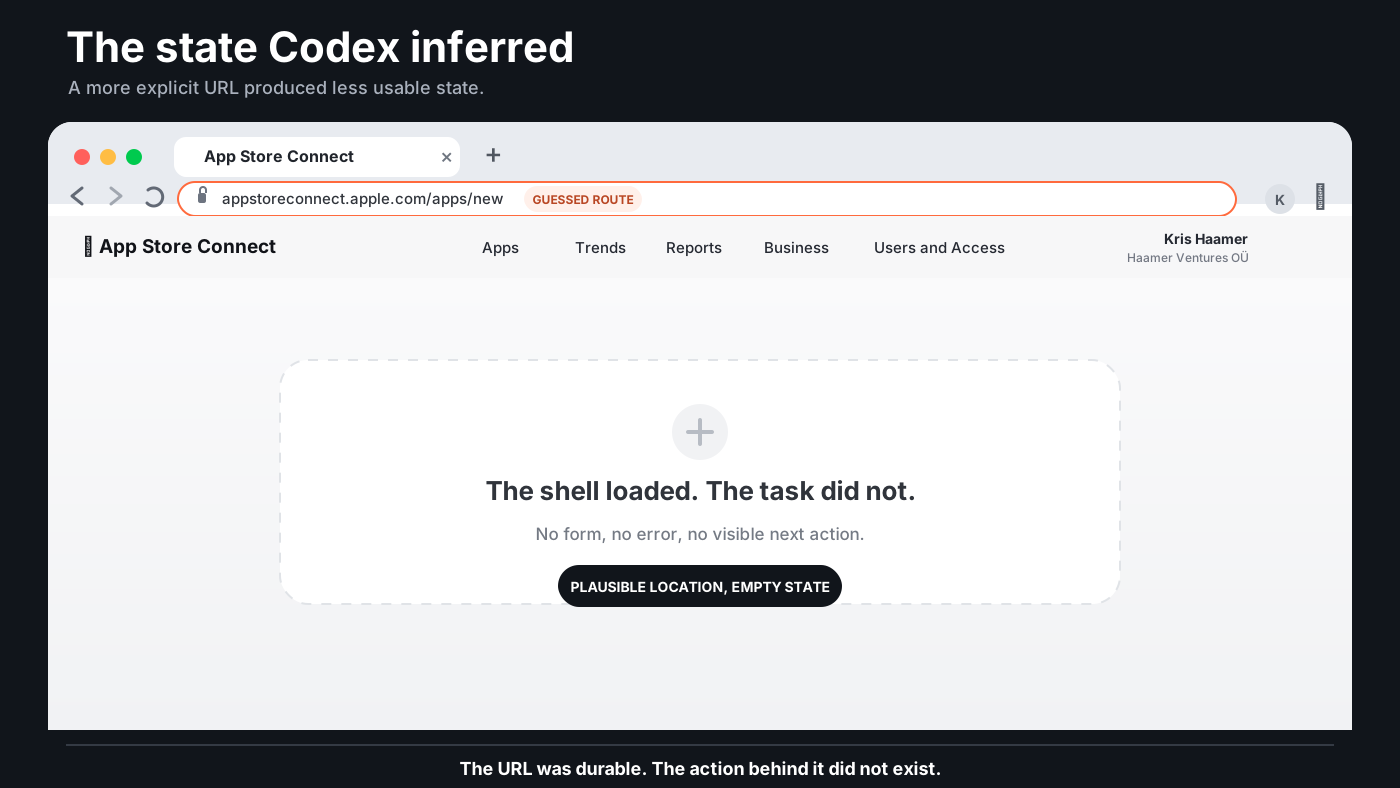
Codex had opened appstoreconnect.apple.com/apps/new. The address looked completely reasonable. Many web applications represent a new object with a route ending in /new, and the page appeared to accept the URL. The App Store Connect header loaded. The navigation loaded. The account name appeared in the top right. The content area below it remained blank.
At first the failure looked like loading. Then it looked like authentication. Then perhaps a front-end error. The strange part was that almost everything around the missing content had loaded correctly, which made the page feel legitimate enough to wait for. It was not a browser error page. It was App Store Connect presenting its own shell around nothing.
I returned to appstoreconnect.apple.com/apps and clicked the small plus button near the Apps heading. A menu appeared. I selected New App. The form opened as a modal on top of the same Apps page.
There was no new page.
There was only a temporary interface state created by a click that Codex had not made.
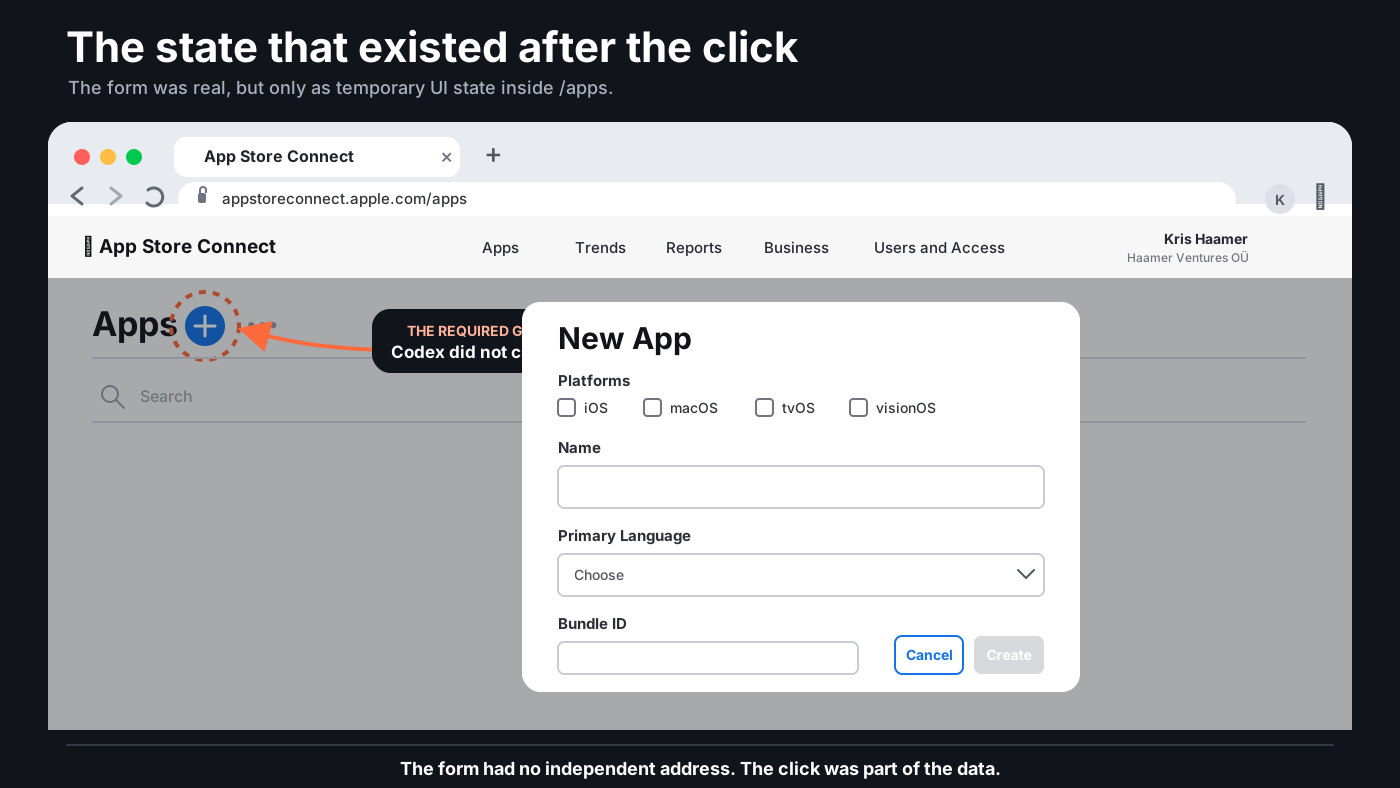
The two browser states were almost comically close. In the working version, the address bar still ended in /apps and the New App form floated above the page. In the failed version, the address ended in /apps/new and the same App Store Connect frame surrounded a blank content area. One state contained the only form that could move the workflow forward. The other looked more addressable, more explicit and more like a real destination, but it led nowhere.
Apple's own instructions describe the process exactly as the interface behaves. Go to Apps, click the add button, choose New App from the pop-up menu and complete the dialog. The app record has to exist before a build can be uploaded. The whole publishing workflow therefore depends on successfully entering a state that is not represented by its own durable page.
This is why the popup was not merely a small usability problem. It became a single point of failure. Codex could do every task before it and potentially every task after it, but none of that mattered once the required transition existed only as a contextual gesture inside a page it had decided to bypass.
The easy reaction is that Codex should have clicked the plus button. That is true. A capable browser agent should recover from a blank page, return to the previous state, inspect the visible controls and try another path. It should not become emotionally attached to a guessed URL. The failure exposed weak recovery behaviour as much as it exposed Apple's interface.
But the URL guess was not irrational. The web has trained both humans and machines to expect important states to have locations. Articles have URLs. Settings pages have URLs. New issue forms, checkout steps and admin screens often have URLs. A stable location can be revisited, shared, restored after a crash and inspected in logs. It creates a piece of state outside the immediate memory of the interface.
The App Store Connect modal did the opposite. The important state existed only after the previous state had been entered and a particular control had been activated. The form was visible, but it was not independently addressable. Refreshing or navigating directly did not reconstruct it. The path was stored in the sequence of interaction rather than in the browser location.
Humans are unusually tolerant of this. We see a plus button near a heading and understand that it probably creates something. We recognise the dimmed background and floating panel as a modal. We can remember that the form came from the Apps page even when the URL does not change. A person barely notices that the application has hidden an important state inside a gesture.
An agent can also see and click, but its planning often starts from a more structural model. It tries to identify the task, infer the destination, navigate there and then operate on the expected page. A route such as /apps/new is attractive because it seems to remove uncertainty. It converts a visual hunt into a direct instruction. In this case, that apparent precision was the trap.
The interface had created a door that only existed after walking through the hallway in the approved order.
I do not think every modal needs its own public URL. Some interactions are genuinely temporary. A confirmation dialog or colour picker may be better as local state. Creating a new app record is different. It is a consequential operation at the beginning of a long workflow. It requires permissions, several fields and a successful server-side result. The state deserves to be enterable, recoverable and verifiable.
A more agent-friendly version could still look exactly the same to a human. The plus button could open the modal while also updating the URL with a stable route or query parameter. The action could be exposed through a documented App Store Connect API. The control could carry a clear semantic label and the resulting state could announce itself in a way automation tools can verify. Closing the modal could restore the previous location. Reloading could reconstruct the form rather than erasing it.
None of these changes require designing the whole product around robots. They are mostly qualities that also make interfaces more resilient for people. Durable state helps when a browser crashes. Semantic controls help screen readers. Explicit success responses help anyone who is unsure whether an action completed. Recoverable flows help people returning after an interruption. Agent-friendly design often turns out to be ordinary robust design with fewer assumptions about memory and improvisation.
The agent also needs a better model of uncertainty. When a destination produces an empty application shell, it should not treat that as the end of the available world. It should compare the current page with the previous one, search for creation controls, inspect accessible names and test the workflow the product itself presents. A guessed route should be a hypothesis, not a commitment.
The failure therefore sits between two incomplete systems. Apple built an interface that assumes a human will follow the visible path. Codex assumed the application would expose the important state as a destination. Neither assumption is absurd. The problem appeared in the seam between them.
That seam may become one of the main design problems of agentic software. We tend to imagine autonomous systems failing on the hardest part of the work: writing correct code, understanding a legal rule, handling certificates, debugging a build or making a strategic decision. In practice, they may finish all of that and stop because one old interface encodes a required transition as a popup, a hover state, an unlabeled icon or a menu that only appears after the right click.
The overall capability of the workflow is then determined by its least addressable step.
This is familiar from other kinds of infrastructure. A complicated railway can be limited by one bridge. A global payment system can be interrupted by one manual approval. A sophisticated organisation can still depend on one spreadsheet maintained by one person. Autonomous software has the same shape. The agent can be impressive across hundreds of actions and still remain non-autonomous because one tiny transition requires a person who knows where to click.
That person was me in this case. I clicked the plus button, opened the form and immediately understood why Codex had failed. The intervention took seconds, which almost made it feel too trivial to matter. But trivial human interventions are exactly what hide the boundary of automation. When a person is already present, the workflow feels mostly automated. Remove that person and the tiny gesture becomes the whole missing system.
The iOS app was not stopped by Swift. It was not stopped by signing, compilation or a complicated App Store policy. It was stopped by a popup without an address and an agent that did not recover from guessing the wrong one.
That sounds like a joke about current AI. It may also be a useful description of the next phase of interface design. We have spent decades making software understandable enough for a person looking at the screen. Now we also need important states to be enterable, inspectable, reversible and verifiable by systems that do not share all of our visual habits.
For now, the autonomous app workflow ended at the smallest possible gap between two nearly identical browser windows. One contained a plus button. The other contained a plausible URL. Only the plus button was real.
Connected reading
- The Browser Is Becoming the Agent's Body
- The Interface Is a Secret Handshake
- The Most Dangerous Interface Is the One That Says Everything Worked
- The Coding Assistant Is Becoming the Development System
- The Interface Is Now Part of the Answer
AI authorship note
This essay began with Kris Haamer observing Codex fail while trying to create an iOS app record in App Store Connect. Kris identified the exact difference between the two browser states, supplied the screenshots and selected the argument that a contextual popup had become the single point of failure. AI supported the drafting, editing, SVG implementation and publishing workflow.