

2026-07-29 · 7 min read · Raw Drafts / UI/UX Comic / Food Delivery / Checkout
Why Can’t a Food Delivery App Tell Me What Dinner Costs?
Professor Octo compares four food delivery checkouts and discovers that the final screen is part receipt, part sales funnel, and part negotiation over what dinner is allowed to cost.
Food delivery should contain one of the easiest transactions on the internet. I am hungry. I choose food. Someone brings it. The product has a clear beginning, a clear ending and an object that can be photographed when something goes wrong.
Then checkout opens.
The burger is still €12, but the interface has started producing new nouns. Delivery fee. Service fee. Platform fee. Small-order fee. Priority delivery. Membership saving. Tip. The amount at the bottom changes while the original thing I wanted remains exactly the same.
This is the first episode of Eight Arms, One Task, a Raw Drafts comic series in which Professor Octo gives several popular apps the same job and watches their interfaces reveal what the companies actually want.
The first task is simple: order the same burger through four food delivery apps.
A note before the experiment: every screen and amount in the comic is an illustrative composite. This is not a live price audit or a claim that one named app always costs more than another. Real fees vary by city, restaurant, distance, demand, basket size, taxes, membership and promotion. The comparison is about how checkout communicates those changes.
Eight Arms, One Task · Episode 1
Use the arrows or keyboard to move through the comic.
1 / 7
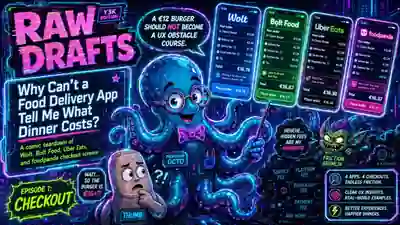
Why Can’t a Food Delivery App Tell Me What Dinner Costs?
Professor Octo begins with four checkout screens and one increasingly expensive burger.
The checkout is where the product changes genre
Before checkout, a food delivery app behaves like a visual marketplace. It shows photographs, cuisines, ratings, delivery times and discounts. Everything is designed to keep desire moving forward.
At checkout, the product changes genre. It becomes accounting software.
This is the moment when the app has to translate the marketplace into a contract. The user needs to know what is being bought, what each extra charge means, what is optional, when money will leave the account and what happens next. The interface has spent ten minutes making dinner feel easy. Now it has one screen to prove that the ease was real.
The problem is that checkout is also the last valuable sales surface. The user has already chosen the restaurant, built a basket and entered the funnel deeply enough that leaving would waste effort. This makes the final screen an ideal place to sell a membership, suggest priority delivery, promote a discount, increase the tip or encourage another item.
The screen therefore has two jobs that do not naturally agree.
It has to explain the price.
It also wants to change the price.
A fee hurts most when it arrives as a plot twist
People do not necessarily reject fees. Delivery obviously costs money. Software costs money. Payment processing, customer support, courier availability and local regulation all create real expenses.
The anger appears when the interface allows one price to form in the user’s head and introduces another price only after the user has invested effort.
That is why visibility matters more than clever naming. A clearly explained €2.49 delivery fee can feel more acceptable than a smaller fee that appears unexpectedly on the last screen. The surprise makes the user re-evaluate the whole journey. The app no longer feels like it helped them order dinner. It feels like it waited until leaving became inconvenient.
Professor Octo calls this fee fog. The total is technically present, but understanding it requires moving through smoke.
The fog can be spatial. Important charges are visually buried among optional extras and promotions.
It can be temporal. One fee appears on the restaurant page, another appears in the basket and another arrives at payment.
It can be linguistic. Several labels describe costs without explaining who receives the money or why the fee exists.
The interface has not hidden the price completely. It has distributed the explanation across enough places that the user has to reconstruct it.
Similar screens can serve different incentives
Food delivery checkouts often look remarkably similar. There is a list of items, an address, a fee breakdown, a payment method, a total and a large button near the bottom.
The interesting differences appear in what interrupts that structure.
One checkout may protect momentum. It keeps visual noise low, explains the total and lets the user finish.
Another may emphasize competitive familiarity. The interface feels like every other delivery app because learning a new checkout would create unnecessary risk.
Another may treat checkout as a membership-conversion opportunity. The screen explains how much the user could save by subscribing at the exact moment the current fees feel painful.
Another may use dense promotions, urgency and optional upgrades to keep changing the deal until the user pays.
None of these goals is automatically evil. A membership can genuinely save money. Priority delivery can matter. A promotion can make the order affordable. The design question is whether these offers remain subordinate to the user’s original task.
The user came to buy dinner. The interface should not make them supervise the company’s monetization strategy before they are allowed to eat.
Good UX for whom?
Design criticism often stops at whether a screen is easy to use. That is too shallow for checkout.
A screen can be easy to use and still direct the user toward an outcome they did not intend. A bright, clear membership card may be excellent at conversion while adding one more decision to a task that should already be finished. A preselected tip may be effortless to accept while making refusal feel socially uncomfortable. A free-delivery threshold may be perfectly understandable while encouraging the user to spend more than the delivery would have cost.
The better question is what the interface is optimizing.
Trust?
Speed?
Basket size?
Subscription growth?
Conversion?
The screen is the business model talking. Every block receives its visual weight because somebody wants an outcome from it.
This is where Professor Octo needs all eight arms. One points at what the user wants. Another points at what the company wants. The remaining six try to stop the Friction Gremlin from adding a mystery fee.
Friction is work the user did not ask for
The word friction is often used to describe any extra step. That makes it sound like the goal of UX is to remove every pause and turn the interface into one enormous Buy button.
Some friction is useful. Confirming an address prevents a failed delivery. Reviewing the total prevents an accidental purchase. Choosing a tip should require an intentional decision. Authentication can protect the account.
The damaging friction is work that exists because the product has failed to organize itself.
The user should not need to compare three totals to discover which one is real. They should not need to open an information icon to learn whether a fee is optional. They should not need to dismiss a subscription offer before seeing the payment button. They should not need to remember whether the discount was applied before or after the service fee.
Good UX removes work. Bad UX relocates it into the user’s head.
Octo’s redesign
The redesign is not radical. That is the point.
Show an estimated total early, before the user builds a complete mental model around the menu price.
Explain every fee in ordinary language and make the explanation available without sending the user into another screen.
Keep tips, priority delivery, memberships and add-ons visibly optional.
Put the exact amount inside the payment button so the final action cannot be separated from its consequence.
Move promotions away from the moment of payment. Checkout should confirm the deal, not continuously renegotiate it.
The best checkout is not the one with the fewest interface elements. It is the one that lets the user understand the transaction without becoming an auditor.
The interface is the receipt for the company’s intentions
This is why food delivery is the right first category for the series. The task is universal, the screen is familiar and the business incentives are visible enough to draw.
The same format can now move through dating profiles, subscription cancellation, location permissions, streaming autoplay, airline seat selection, bank onboarding and every other place where several apps perform the same task differently.
The comic is fun because Professor Octo can hold four phones at once. The analysis matters because those phones are never only showing four design styles.
They are showing four organizations deciding what should happen to the user next.
Connected reading
- Every Interface Contains a Business Model
- The Shopping List Is Becoming a Constitution
- The Last Obstacle Was a Popup
- A Toggle Is Not an Explanation
- The Interface Is Now Part of the Answer
AI authorship note
This series began with Kris Haamer’s idea for a Raw Drafts format that compares the same screen or task across popular apps through a recurring comic character. Kris chose food delivery checkout as the first category, directed the analysis toward fees and business incentives, selected Professor Octo as the teacher, and asked for the Y3K cyberpunk visual system used in the final slideshow. AI supported format development, visual generation, drafting, editing and implementation. The editorial angle and publication decision belong to Kris Haamer.