

2026-07-14 · 9 min read · Raw Drafts / Learning Design / AI
The Lesson Is Cheap. The Sequence Is the Product.
When AI can generate and reformat a polished lesson in seconds, the scarce part of learning becomes deciding what should happen next.
I asked ChatGPT to teach me drawing one day at a time. I wanted something close to Duolingo: one small skill, one visual demonstration, a short exercise, a common mistake to watch for, and a reason to return tomorrow.
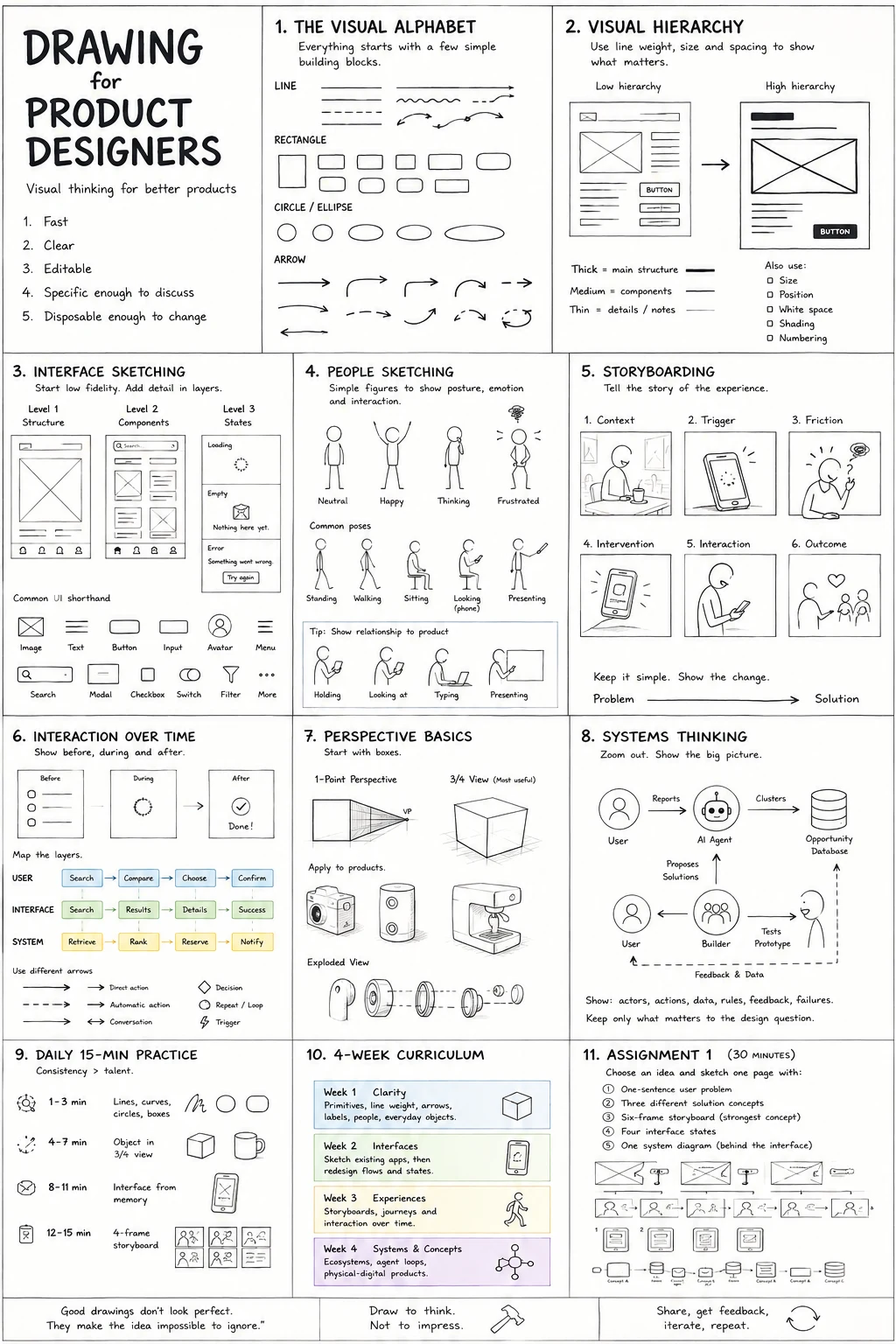
The first response was a poster showing the entire journey from basic lines to more advanced drawing. It looked useful, but it answered a different question. I had asked for a teacher that would continue over time. The poster gave me a compressed overview of everything I might eventually learn.
After I clarified the request, the lessons became more focused. The first exercise dealt with line control. A later lesson introduced the cube as a way to turn flat shapes into three-dimensional forms. When the lesson appeared in a portrait format, I asked for a 16:9 version.
A few seconds later, the new version looked ready for an online course. The construction sequence moved naturally from left to right. The exercise occupied its own panel. The warning, challenge, and progress indicator fitted along the bottom. It could have been displayed on a classroom screen, inserted into a presentation, or used as a frame in a video lesson.
The transformation was fast enough to make the lesson itself feel less valuable.
I do not mean that the lesson was poor. It communicated the basic idea clearly. The image showed how the sides of a cube recede toward two vanishing points, and the exercise asked the learner to repeat the process several times. The problem was that I could generate another version almost immediately. I could ask for a square format, a printable worksheet, a darker visual style, a version for children, or a simplified version with fewer words.
The visible teaching material had become abundant.
The harder question was whether I should be learning cubes at all.
A good lesson can still arrive at the wrong moment
The cube lesson followed a plausible curriculum. A beginner starts with lines, moves toward shapes, turns shapes into forms, and eventually learns perspective, light, people, and environments.
That progression makes sense as a general map. It says very little about the person following it.
Had I completed the earlier line exercise? Were my vertical lines still leaning? Could I draw a square using four confident strokes, or was I slowly correcting every edge? Had I understood the previous lesson, or had the calendar simply moved forward?
The system did not know because it had not looked at my work.
This is one of the weaknesses hidden by polished educational content. A clear explanation creates the impression that teaching has happened. The learner has seen the idea, clicked through the exercise, and reached the next screen. The course records completion because completion is easy to record.
Learning is harder to detect.
A person can understand two-point perspective in theory and still be unable to draw a convincing cube. They may place the vanishing points correctly while making the vertical edges tilt. They may understand where the lines should go but draw them with a series of uncertain scratches. They may produce one careful cube and then lose control as soon as the exercise becomes repetitive.
These are different problems. Each one suggests a different next lesson.
A teacher might ask one learner to repeat vertical lines, another to practise drawing from the shoulder, and another to construct larger cubes without a ruler. A fixed course usually sends all three learners to the same next page.
The order of lessons matters, but the decisions between lessons matter more.
Generative AI has changed the production problem
Educational material has traditionally required a lot of work before the learner sees it. Someone writes the explanation, plans the exercise, draws the diagram, edits the wording, lays out the page, and prepares versions for different formats.
AI can now compress much of that process.
The drawing poster is a small example. The same lesson moved from portrait to landscape almost instantly. It could also be translated, narrated, animated, or rebuilt for another age group. An instructor no longer needs to create every variation manually.
This is useful because educational content often fails for practical reasons. The diagram is missing. The example does not fit the learner’s device. The course has not been translated. The explanation assumes too much prior knowledge. Generative systems can produce alternatives while the learner is still present.
At the same time, cheaper production weakens the advantage of simply owning a large library of lessons.
When content was difficult to make, a thousand carefully produced lessons represented a significant product. When lessons can be generated when needed, the library becomes less impressive. The learner can already find endless tutorials, videos, worksheets, and explanations. Adding another pile of material does not necessarily improve the experience.
The learner still needs to know what to do today.
This becomes more difficult as the supply of material grows. A beginner who searches for perspective drawing can find explanations ranging from five-minute exercises to architectural construction systems. All of them may be accurate. The abundance shifts responsibility back to someone who does not yet know enough to choose well.
A learning product becomes useful when it absorbs that responsibility.
It should understand the larger curriculum, observe what happened during practice, and select a reasonable next task. Sometimes that task will introduce a new idea. Sometimes it will repeat an old exercise with a small variation. Sometimes it should tell the learner to stop adding complexity and fix a basic weakness first.
Generating another lesson is easy. Deciding against generating one may require more judgment.
The curriculum has to remember
Drawing skills do not form a straight ladder.
A cube depends on line control. A cup introduces ellipses, symmetry, proportion, and perspective. A portrait brings together shape, measurement, construction, value, and observation. Earlier skills return inside later subjects, often in forms that are harder to recognise.
A useful curriculum therefore needs loops. It should bring back old skills after a delay and test whether they survived outside the original exercise.
The learner might draw parallel lines during the first week, then encounter the same problem when drawing the sides of a building. Circles might return as wheels, bowls, heads, joints, or cylinders in perspective. Value exercises might return when a face appears flat even though its proportions are correct.
This kind of repetition differs from showing the same lesson again. The skill returns inside a new situation, where the learner has to recognise and use it without being told exactly what it is.
The system also needs to remember personal patterns. Perhaps the learner always makes objects too narrow. Perhaps they avoid dark shadows because they are afraid of ruining the page. Perhaps they draw carefully from reference but struggle to construct anything from memory.
Those patterns are more important than the number of completed lessons.
A drawing app could ask the learner to photograph the page after each exercise. The software would not need to judge the work as beautiful or ugly. It would need to notice practical things: whether lines converge consistently, whether the proportions match the reference, whether the learner used many short strokes, or whether the form has become flatter than intended.
The feedback should lead somewhere. Saying that a cube is 78 percent accurate is less useful than asking the learner to redraw it with wider vanishing points because the first version feels distorted.
The evaluation matters because it changes what happens next.
The poster still matters
It would be easy to dismiss the generated poster as decoration, but its format affects how the lesson is understood.
The portrait version felt like a worksheet. The learner moved downward through the instructions. The 16:9 version behaved more like a teaching slide. The steps became a horizontal sequence, and the whole construction process remained visible at once.
Changing the aspect ratio altered the rhythm of the lesson.
This suggests that generative systems can become genuinely useful production tools for education. A teacher could adapt the same material for a classroom projector, a printed handout, a phone screen, or a short video. The explanation would remain connected while the presentation changed around the situation.
The mistake would be to treat this flexibility as personalization by itself.
A lesson can fit the screen perfectly and still arrive too early. It can use the learner’s preferred colors, language, and illustration style while ignoring the mistake they made yesterday. Visual adaptation improves access and attention, but the curriculum also has to adapt.
The 16:9 poster is the part of the system that is easiest to notice. The more important work happens before the poster appears.
Someone, or something, has to decide that today is cube day.
The tutor exists between the pages
Most educational AI demonstrations focus on generated output. A diagram appears from a sentence. A digital instructor explains a difficult subject. A worksheet becomes an animation. A lesson is instantly translated.
These moments are easy to demonstrate because the result is visible.
A responsive curriculum is quieter. It notices that the learner keeps making the same mistake. It changes the next exercise. It returns to an earlier skill without making the learner feel that they have failed. It increases the difficulty when repetition has become too easy.
There may be no impressive screen to show. The learner simply receives a more appropriate task the next day.
This requires memory, observation, and a model of how the skill develops. It also requires restraint. A system that can generate infinite lessons may feel pressure to keep producing novelty. Learning often requires doing the same basic movement again, paying attention to a slightly different part of it.
The learner does not always need more content. Sometimes they need a better correction.
That is what I was asking for when I said I wanted Duolingo for drawing. The streaks and small lessons were only the visible structure. What I really wanted was confidence that tomorrow’s exercise would have some relationship to what happened today.
The cube poster showed how quickly educational assets can now be created and reshaped. It also made the missing part easier to see.
The lesson can be generated in seconds.
The product begins with the decision to show it.
AI authorship note
This essay began with Kris Haamer asking ChatGPT for a progressive daily drawing course, receiving generated lesson posters, and requesting that the cube lesson be reformatted to 16:9. AI supported the visual generation, drafting, editing, implementation, and the interactive seven-day course. Kris is responsible for the experience described, the editorial direction, and the decision to publish it.
Connected reading
- I Asked for a Drawing Teacher and Got a Poster
- How Companies Actually Do Data-Driven Design
- The Product Needs a Harness
Try the seven-day sequence
The small course below starts with line control and unlocks one new paper-first lesson each local calendar day. It remembers the start date and completed lessons in this browser.
It is deliberately modest. It does not yet inspect a photograph of the page or adapt to every mistake. It begins with the part the poster could not provide: a next lesson that arrives after the previous one.